A few of my friends and I are working on the design of a robust, portable computing form factor. After previously consdering various of the Gigabyte Brix Pro series, we settled on the Skull Canyon as the core of the ensemble, currently composed of:
Everything worked the first time it was plugged together, and now the system can run StarCraft II: LoTV with medium settings under Wine on Arch GNU/Linux. The next steps are to transform the output from a LiFePo4 motorcycle battery (via a DC-DC converter) to the correct voltage, furnish a case and smaller keyboard, and start testing/optimizing the setup in the field.
Edit: The 45W TDP of the NUC6i7KYK was its main advantage when compared to discretely sourcing comparable or superior components for a mini-ITX build. Even after doubling the power draw to account for a screen, speakers, and additional cooling, two kilograms of lithium should provide two hours of roaming battery life (and weight minimization is low on our priority list).
That monitor is horribly overpriced for what you get.
The LCD can be purchased in QTY 1 from AliExpress for $25 USD with free shipping to almost anywhere in the world. [1]
A guy in Japan makes a DP board which is better than the Adafruit one and which you can buy for about $40 USD shipped from Japan (3,500 JPY + 800 JPY shipping). [2]
I've bought 5 so far and they all work great. One was DOA but the seller kindly shipped me a replacement free of charge. It's also 5V powered, so you can power it directly from the computer using a USB cable, no need for an extra 9V (seriously, 9V. why?) power supply.
You can easily laser cut a stand from plywood or lexan to mount the LCD. Or, you can buy the actual iPad aluminium housing ($22 + $8 for the digitizer glass) and mount the adapter on the back.
It really bothers me that Adafruit is selling that kit for $225 when you can build one yourself for well under $100. Their profit margins must be insane.
I am sure that most people are aware of how overpriced adafruit is. I still use them when I prototype because they test their products, their website is a fun place to visit, and they tend to support their products with tutorials. If I want 50 of something I would never use adafruit, but for individual items I am fine with supporting them.
I don't doubt for many products you can assemble it yourself more cheaply with the input of time. But, a price factor of 2.25 over raw parts (COGS, cost of goods sold) is pretty reasonable overhead. It's not the best margin, but it's right within reasonable for paying for assembly, inventory housing, warranty coverage, etc.
> But, a price factor of 2.25 over raw parts (COGS, cost of goods sold) is pretty reasonable overhead.
If this were a normal commercial product, I would agree with you.
But the fact is, when you buy this Adafruit kit, you're getting the raw parts which you have to assemble, the monitor has fewer features than a normal desktop LCD monitor (only one resolution supported, only DisplayPort input) and given that it's the bare LCD, is much more fragile than a commercial monitor.
So, yes, normally it is absolutely reasonable and expected for a manufacturer to charge 2-2.5x the price of raw goods. But in this case you're literally paying Adafruit 200% to do simple supply chain logistics for you, and you're getting a pile of parts which you can buy (with free shipping!) from FleaBay/AliExpress with a few clicks of your mouse.
For this kit, you're assembling the plastic enclosure, but the electronics are pre-assembled (and I assume pre-tested), so it's not exactly a bag of parts. I'd agree that it is not a full retail product. I'd say it is a somewhat boutique, low-volume product - for that I've seen much much higher then 3x COGS.
Maybe I'm just at a low hassle tolerance from having to juggle too many past return transactions on AlieBay components and am overvaluing getting the logistics done for getting working electronics without going through the time of finding the right LCD, integrating the parts, getting it to drive correctly, etc.
Overall, I guess I'm someone whose also willing to let a bit of extra margin go to Adafruit which keeps doing interesting things. In the end, there's plenty of room for everyone to make their own price/value judgement, I certainly don't think my view should override others in this area.
I think Adafruit is pushing the limit of reasonable. The price of their products isn't terrible, but with the prices they charge I'd expect a free shipping option or something similar. Their prices are basically in line with what I would expect a retail store to charge. A mail-order warehouse has a much lower overhead per unit than a retail store. They do not need to be as well lit, the fixtures are cheaper over their lifetime, they turn over inventory much faster, products take up less space, etc.
I suspect their high prices are dictated by their New York, NY location. The location may help attract talent, but it doesn't make sense to locating the warehouse for a mail-order business in the most expensive city in the United States.
I don't want to suggest they shouldn't be located in NYC. That is their prerogative. I think the "Adafruit is way too expensive" argument is valid. They are insanely expensive, and while their documentation is fairly good, they are other companies that provide similar value at a price that is much lower than adafruit.
I've made one as well (using the iPad housing). The most difficult part is mounting the adapter on the back: The cable from the panel is somewhat short and I had to pay an extortionate price to get the right size standoffs that were short enough not to stress the cable. It would be helpful if someone published the slot location/dimensions (hint, hint).
When I started, I emailed Adafruit about selling the stand separate from the kit. They mentioned they'd take it under advisement, and that was the end of it.
Thank you for posting this. I think paying $100 extra is not too much for saving yourself from the trouble of organising all of this. It is beautiful that the world has things for everyone to explore. I would certainly go DIY route, because I am interested in those things, but I also get that there are people who couldn't be bothered less about putting this thing together and just get the premium service.
Thanks for this info, I know Adafruit is overpriced, but had no idea where to go about doing it myself.
Why do both drivers have this warning? What would make it not work with an HDMI adapter, and is there any way to somehow use this with an HDMI output?
> Just to make sure this is very clear, this adapter will NOT work with HDMI connectors, will NOT work with HDMI to DisplayPort adapters (passive or active)
Because the LCD is an eDP (embedded DisplayPort) LCD, both Adafruit and Abusemark boards are only breakout boards to turn the FPC connection into a mini/DisplayPort port.
> What would make it not work with an HDMI adapter
Unlike a normal desktop monitor, which has a PCB inside with a chip that accepts a variety of inputs and drives the display in its native format (LVDS or eDP) [1], these adapters lack that. They rely on the controller inside the LP097QX1 LCD itself, which only speaks eDP because it's designed to be used in tablets which output eDP.
You cannot drive the LCD at any resolution other than 2048x1536@60Hz. The LCD doesn't support any other resolution or refresh rates.
> and is there any way to somehow use this with an HDMI output?
> NOTE: FPC connector which attaches the panel to adapter board is VERY fragile. User must be very careful lifting up the connector tab and pushing it back into place.
I am aware of this one as well, but what qualities make it "better" than the Abusemark model I linked to?
It's 3 times more expensive ($35 versus $99), uses 12V input (and thus cannot be USB powered), and has an 8-bit micro (ATxmega32A4U) instead of the 32-bit micro found on the Abusemark board (STM32F103CB). They both feature dual backlight drivers, although rozsnyo isn't listing what driver chips they're using, I suspect it's the same as Abusemark.
The Abusemark firmware even provides a USB serial device in addition to firmware updates, which the rozsnyo lacks.
Thank you very much for this detailed alternative. Echoing other commenters, I chose the Adafruit Qualia kit (not even buying the screen and driver board discrete and separate from Adafruit) as an exercise in known, commercially available components. Subsequent iterations will definitely minimize the convenience margin, so long as the resulting custom product does not suffer in functionality.
The Alibaba link is live and excellent; I was for a while considering a 14" Carbon X1 screen (2560 x 1440) [0], but the 4:3 aspect ratio of the iPad Mini ultimately won out.
Your Japanese connection is a good resource to have (and quite gloriously culturally shameless [1]).
In a phrase, I want to increase the density of my personal computing platforms: as small, powerful, and self-contained as feasible.
I fear I am radically out of date with the Toughbook series if they now include i7 processors and 2K resolution screens. Do you have a model in mind to which I could compare my project?
1) Replace my heavy but relatively delicate four year old Asus gaming laptop with a solid state machine that can be packed in a Pelican case and dropped down the stairs without concern.
2) Try my hand at hardware a bit below the metalshop, a bit beyond Arduino.
Thanks for the reply. I just thought that 32gb ram and linux is an odd choice for a gaming (only) machine. But the do-it-yourself side of it is something I can relate to :)
If you don't mind the size, you could save a ton of travel space with a 60% mech board like the Poker. You could easily fit all of that into a backpack closed, but I don't know about the Das fitting in.
Most impressive. Yes, approximately that, running off motorcycle batteries, thus the compromise of no discrete GPU, which would (conservatively) triple the power budget.
Regarding the keyboard, on the roadmap is a hand-made "gull wing" (hinged thumb joint) split mechanical keyboard, in the style of AcidFire's design [0] but with only 44 keys total: four for each long finger, six for each thumb, 22 per hand.
These companies selling Ubuntu machines are still charging more for the hardware than someone else selling the same thing with Windows installed. The reason I want to buy a machine with Ubuntu installed is because I don't want to be forced to pay $99 for a MS license. But that doesn't mean I want to pay someone else $199 to install Ubuntu.
Building a machine from parts from NewEgg gets you a machine without Windows installed, without paying $99 or $199 for OS installation, doesn't take very much time or knowledge, and also helps NewEgg fight patent trolls.
On the other hand, I am happy to pay for a machine that I know will work perfectly with Ubuntu. I have neither time nor patience with broken linux installations, if a company can guarantee a set of hardware that works under Ubuntu(or any other distro) would be happy to pay for it.
And Ubuntu chokes for me on my GTX780 and my Intel-217V ethernet card, both of which are apparently fully supported. We can throw anecdotes all day long, but until there is some research saying otherwise, I don't believe that Ubuntu will work with more hardware without any fuss than Windows 10.
And the whole point of my post was that I don't want to waste my time to "build and see". I want to give someone money to give me something that is 100% guaranteed to work.
Okay. I guess if you can't be bothered to conduct your own research, enjoy life in the "I can't build my own machine and pay hundreds of dollars for someone else to install my operating system" lane. Also, sorry to bear awful news, but nothing is 100% guaranteed to work unless you're buying from a liar.
I think maybe they included the Starcraft II reference as a way to gauge performance, not as the primary purpose of the systems.
That said, apparently Wine performance loss is quite variable and ranges from negligible to quite large, depending on drivers and what actions the program is attempting (because not all syscalls that are proxies have direct equivalents, or may be as fast, but also may be faster, etc). But I haven't used Wine in a long time.
No doubt. SCII:LotV is the most graphically intense game I run on a regular basis, and my personal performance benchmark. If it didn't work, I would lose trust in the overall capabilities of the system.
Yeah, that might be the case. I think it would have to require user activation. Maybe select acronym, right-click, click "Define" and it displays a list of possibilities.
I might try and make one just to keep my JavaScript sharp -- been away from it for a while.
Connecting to one of those websites that list possible acronym meanings, you could hover over a TLA and it will list possibilities? Or right click and show more.. Something along those lines
Pretty decent GPU performance, 80% performance of the non-overclocked 4790K, which is my go to desktop processor these days. And it has 40% of the performance of the top end processors available.
The GPU is rated 1,921 on the PassMark website, which is about 6x slower than the top GPUs. It is 3x slower than what were mid-range GPUs 4 years ago. It is okay-ish, but it is pretty slow compared to what is available.
Thus it is a good desktop machine for non-3D workflows. Like using Word or Web Browsing at 4K. I can not imagine anyone having problems with that. It will likely be quite snappy.
I think anyone interested in 3D games will be dissatisfied with the GPU performance, and that will be very pronounced at high screen (4K) resolutions.
I could see picking these up for our non-developer non-content creator employees. But not for our developers or 3D artists.
Web browsing at 4K is a surprisingly expensive task in itself. I own a Surface Book and one of my biggest gripes (aside from the broken firmware) is that the integrated GPU is too weak to drive browser rendering fast enough to keep up with the touch screen on the vast majority of websites* . This gets a lot worse when hooked up to an actual external 4k display - the scrolling latency is pretty unpleasant.
* It seems that they optimized Edge to have really good scrolling performance, but ff/chrome/opera all have serious scrolling issues.
I have the same problem globally in Linux. On dual 4k monitors, scrolling isn't an animation so much as it's a slow progression of frames in a slideshow.
I notice the same with a maximized Firefox on 4K, but it became much snappier after I deactivated smooth scrolling in about:config. For fullscreen videos in Firefox, it helps to suspend compositing (Alt+Shift+F12 in KWin).
FWIW, I run 2d desktop apps and the web browser at 2560x1440@144Hz just fine on my NUC6i7KYK. I use a non-composited desktop with DRI3 turned on. Tear-free in chromium (since it does internal compositing buffering) and perfectly smooth.
I find fanless designs that use Intel NUCs, or similar, way more interesting [1-5]. If I want power, I'd do a custom build and use a much bigger form factor for better cooling and FLOPS/$.
Well obviously this is a "performance" NUC but it surprises me they don't offer a Core-M model (price?), which would facilitate a fanless 'kit', without specialised 3rd-party housing.
I don't need the performance, so if I'd probably go with the budget sensitive Celeron-based Brix that is fanless. Braswell based, so I guess Apollo Lake will be another year away.
Yes, I couldn't agree more. All of the ones I posted above are fanless. There are many cases that would allow you to build a fanless NUC by replacing Intel's case.
Really nice, except the design. I mean it looks like the front ports where aligned via CSS vertical-align. And the skull probably looks cool if you're 14.
We had a previous discussion about this, and for its price ($675 with no RAM or SSD?) you can build a really nice mini-ITX system that uses a full size PCI-Express 3.0 video card. The mini-itx system will run circles around this with its laptop CPU. With the right mini-itx case it will still fit nicely into a home theatre setup or in relatively small spaces.
I'm shopping for a laptop lately, and you can actually get a pretty decent midrange laptop for that price (with a discrete GTX 940M or 950M GPU) and a 1080P display. It won't have an i7 in that price range, but with a better GPU you'd be able to play games more effectively, and an i5 is fine for everything I ever do. So, yeah, I agree...this is pricey for what it is.
I've also been surprised to find that laptops are now about the same price as similar specs in a desktop or small form factor mini PC.
For example: Acer Aspire V Nitro was onsale from Newegg for $650 recently. 15", i7-4720HQ, 1080P, 960M, 8GB ram /w one slot open. Haswell era but that just makes me want to see a comparison all the more.
The really nice thing about this unit is that it has dual M.2 slots (for if you want to throw absurd NVMe at it) and it has the new Thunderbolt (so you can plug an expensive external GPU enclosure on it). Either one of these paths will cost you that $650 purchase price again! But there's nothing else out there with this kind of performance density, carry-ability really. (Perhaps until the xb1s?)
Sure, the laptop comparison is interesting. But the real point of this i7 is that it's quad core (there're mobile i7 processors, especially in the U line, which are dual core), and that usually pushes up the price quite a bit. But as a portable desktop/development machine, I think the idea is quite interesting, maybe one of the most interesting that came out lately.
I can see how it would have its place in some circumstances, but they seem to be targeting a gaming/entertainment market segment, which is problematic with Intel integrated graphics (which have improved remarkably over the years, but still trail the leading edge of nVidia and ATI GPUs by several years). And, lately, I think the folks doing heavy computation are looking to GPUs for the thinky parts; certainly scientific computing is happening more and more on GPUs rather than CPUs. So, even in those cases, I might prefer a fast GPU to a slightly faster CPU.
Anyway, the price is a little high, though I'm sure the quality is good; Intel's servers have always been excellent.
I'm thinking about doing a similar setup and I like the smaller form factor because I can attach it to the back of a monitor and not even have to look at it.
Take a look at the Antec ISK-110. Not as small as the NUCs, but lets you build your own machine on the cheap, and still designed to be attached to the back of a monitor.
(Won't fit a standalone GPU, but I don't think anything that can be attached to a monitor can)
I've found the Zotac NEN (branded as a Steam Machine, but obviously perfectly capable with any other linux / Windows OS) to be another great solution to the problem of getting a very compact machine with capable hardware.
It uses a soldered GPU roughly comparable to an NVIDIA GTX 960, so it does 4K@60hz over HDMI 2.0, and has some really killer IO options. Dual gigabit ethernet, Intel wifi chipset, M.2 PCIe and SATA, USB-C 3.0, etc, etc... Upgradable desktop-class CPU, upgradable RAM, and often runs totally silent.
I spent a long time evaluating various mITX builds (I've been in the DIY enthusiast PC game for years and years), but eventually had to bite the bullet and realize that I couldn't build anything this small and this powerful for comparable cost.
Any advice for someone interested purely in CPU cores/speed, power consumption, large amounts of ECC memory, silence and some storage options (like 2.5" SSD fitting the box) but not at all in GPU power, when it comes to such small systems?
It will be difficult to find anything with a mini-itx motherboard (170x170mm size, standard ATX type rear I/O plate) or smaller that supports ECC RAM.
There's lots of ways to put a nearly silent water cooling system on a 65W TDP CPU, have an awesome GPU in it and keep it fairly small, but the ECC RAM part will require you to use a workstation/server class motherboard.
Depending upon how long the full-size graphics card is, the Dan A4-SFX [1][2], NCase M1 [3][4], and NFC Systems S4 Mini [5][6] mITX cases might be worth a look.
I find this type of oversight to be way too common whenever I try to venture into buying PC hardware.
Not only is the content of the marketing site drivel and less than useful, but the design of the technical side, such as finding drivers or tech documentation, is horrific as far as web design.
I have a feeling that because the leaders in the field are so bad at it (for example see Bill Gates critical emails of microsoft.com, which to this day have not been corrected), everybody else sets their bar fairly low.
It's bleeding into things like Ubuntu too now. When I try to go look up technical details on Snap, what can I find? Basically nothing except a tutorial. Click click click click and the same content over and over again presented in different ways.
This is pure marketing-driven engineering. Not a bad thing per-se but they should start considering also a more pragmatic approach. They should pick a form-factor that can be future-proofed and avoid changing their mind every iteration. Current NUC form factor is too small for high TDP cpu, because of cooling, and instead of adjusting the current form-factor (e.g. expanding its width) they created another (maybe pointless) design. Advice to management start considering also the medium-term landscape. I will be more than happy to replace my NUCs is you give me consistency. If in doubt ask Apple.
I agree, I don't see why fundamentally a desktop CPU cannot fit in a small form factor. It could be a bit bigger than the skull canyon, say 2 or 3 times as high and still qualify to be called a mini PC.
4k (3840 × 2160 @ 60Hz) is already possible since the NUC Rock Canyon models[0] and Maple Canyon models[1], all based on 5th gen core processors code named Broadwell, available since Q1/2015.
The latest are the Swift Canyon models[2] based on the 6th gen core processors code named Skylake, available since Q4/2015, joined now by Skull Canyon[3].
I agree, the price at Amazon.com is $673 (and you still need RAM and a SSD). You can build a pretty decent gaming PC at that price, the only disadvantage being portability. But how often do you need to move your gaming PC?
The Iris Pro 580 has about the performance of a desktop GTX 750ti which isn't bad, it can actually match the performance of "discrete" low to mid range mobile GPU's from both companies like the oh so popular GTX 750/850M.
You won't get any decent GPU in a package this small anyhow, that said you can plug in an external GPU via the Thunderbolt port with ease.
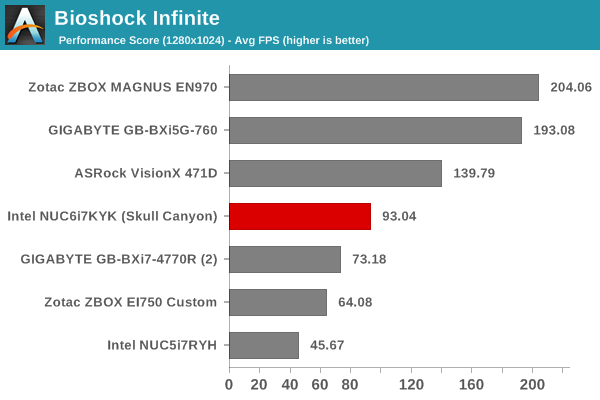
The 580 manages to beat the GB-BXi5G-760 in some benchmarks which has desktop GTX 760 in it, it only really gets smoked by the Zotac box which has a desktop GTX 960 which is a 200-230$ card.
The only downside is that these boxes are nearly the same price as desktops with similar specs. So I may stick with desktops just because they are more easily upgradable.
There are no conflicting benchmarks, synthetic benchmarks are never a good indicator of actual gameplay performance, and passmark is the one of worst benchmarks to begin with.
That said I really like this new NUC, it can actually replace a laptop for most people that only drag it to work and never really work on the go outside of an office environment.
It's considerably cheaper and blows the MBP15 out of the water when it comes to performance, heck if you want to do high end gaming on it than an external GPU enclosure + a GTX 1080/1070 + the NUC would be cheaper than a high end gaming laptop while delivering much more performance.
Even if you need a more mobile setup it wouldn't surprise me to se 3rd parties making battery packs for the NUC and you can get a portable LCD monitor like the AOC E1659FWU for about 100$, and considering that most places people would work with a laptop (coffee shops, restaurants, libraries, trains, airplanes etc) anyhow have power you might not even need a battery pack.
> There are no conflicting benchmarks, synthetic benchmarks are never a good indicator of actual gameplay performance, and passmark is the one of worst benchmarks to begin with.
I have found passmark to be excellence in predicting real-world performance for both GPUs and CPUs.
I believe that it is because the game FPS benchmarks are testing things other than just pure GPU performance -- which is okay if you care about those specific games, but it then isn't an indicator of GPU performance. In many games the GeForce 760 doubles the Iris 580 performance as it does in the PassMark ratings:
Benchmark points are meaningless you can have a card which scored 3000 and a card which scores 1500 but both of them won't give you playable framerates in games.
If you are looking for game performances don't bother looking at synthetic benchmarks.
Same goes for compute performance look at real world benchmarks the rest is meaningless.
You should also consider that benchmarks are the most optimized software for all vendors which adds another layer of illusion on top.
Keep in mind this is probably more drivers than hardware. NVIDIA and AMD (by way of ATI) have many more years of experience optimizing drivers for games. I wouldn't be shocked if a year from now these chips were pretty even with some lower end gpus entirely. I think the real issue is that you don't upgrade CPUs like you do a GPU, especially for Intel, since it almost always means a new motherboard and ram. I just wish a 8 core Intel didn't cost a small fortune, hopefully AMD's new chips put enough pressure to make that happen.
They missed an opportunity to add GDDR5 directly on the mainboard. That's how AMD is cranking out pretty good performance for the PS4 despite it using an APU.
The Intel CPU used in this product has a 128MB L4 cache to be used by the CPU and GPU. It has it's own benefits compared to the PS4's GDDR5 unified memory approach.
Yes. Thunderbolt 3 supports 40Gbps and should allow for an external GTX 1070 or 1080. The cheapest Thunderbolt 2 PCIe chassis on Amazon is around $200, and I don't see why we can't have a Thunderbolt 3 PCIe chassis at this price point.
I've been waiting for a long time for decent TB3 peripherals, manufacturers are very slow. I simply want a thunderbolt to dual hdmi with a few USBs so that I can put my tower on the opposite side of my room.
$649.99 (+tax/postage). You can buy it on NewEgg, B&H Photo, and Adorama search for NUC6i7KYK. Amazon has a listing but it is for a third party seller who is charging $669 (+$19).
So it has three video outputs, but can it drive all three?
The big advantage of a stationary computer over a laptop these days is that it can drive displays, in the plural, so that your use-case is the only factor deciding how many screens to have.
I use a bunch of NUCs for prototyping cluster development for Cassandra, Celery, and Storm. I believe the economics are much better than doing the same with cloud, because I don't feel that nagging "tick tock" of metered usage. I bought 6 gigabyte BRIX PROs, stuffed them each with 16GB RAM and 1TB SSD, each has 4790 CPUs, and I feel very good about prototyping in my own time on this little cluster, for deployment later. Perfect "training" system.
AMD has for several years, the almost free compared to intel prices, 4cored 5350 apu. it serves 4k out of display port ot hdmi. and is very low watt (my htpc runs passively cooled. though not pumping 4k, wich is useless still)
sadly it's mostly ignored by everyone because there's only two relevant motherboards for it.
Like you, I'm surprised that AMD doesn't have the NUC equivalent. Back when Via invented the "ITX" standard and Intel dismissed it, AMD sold quite a few CPUs in that form factor. Now while "NUC" is an Intel take on small, it could easily be done by AMD (and as you point out possibly better than Intel can). Further if AMD was the system supplier (like Intel is for the NUC) they could get better margins on the chips they sold in those systems.


1) Intel NUC Kit NUC6i7KYK
2) 32 (2 x 16) GiB DDR4 2133MHz RAM (G.SKILL Ripjaws) 3) 512 GB M.2 NVMe SSD (Samsung 950 Pro)
4) 9.7" 2048x1536 DisplayPort Monitor (Adafruit Qualia kit)
5) 104 key mechanical keyboard w/Cherry MX Blue switches (DAS Professional)
Everything worked the first time it was plugged together, and now the system can run StarCraft II: LoTV with medium settings under Wine on Arch GNU/Linux. The next steps are to transform the output from a LiFePo4 motorcycle battery (via a DC-DC converter) to the correct voltage, furnish a case and smaller keyboard, and start testing/optimizing the setup in the field.
Edit: The 45W TDP of the NUC6i7KYK was its main advantage when compared to discretely sourcing comparable or superior components for a mini-ITX build. Even after doubling the power draw to account for a screen, speakers, and additional cooling, two kilograms of lithium should provide two hours of roaming battery life (and weight minimization is low on our priority list).